

[Aug-2025 Newly Released] Pass Network-Security-Essentials Exam - Real Questions and Answers
Pass Network-Security-Essentials Review Guide, Reliable Network-Security-Essentials Test Engine
NEW QUESTION # 20
In Firebox System Manager, where can you perform each of these tasks?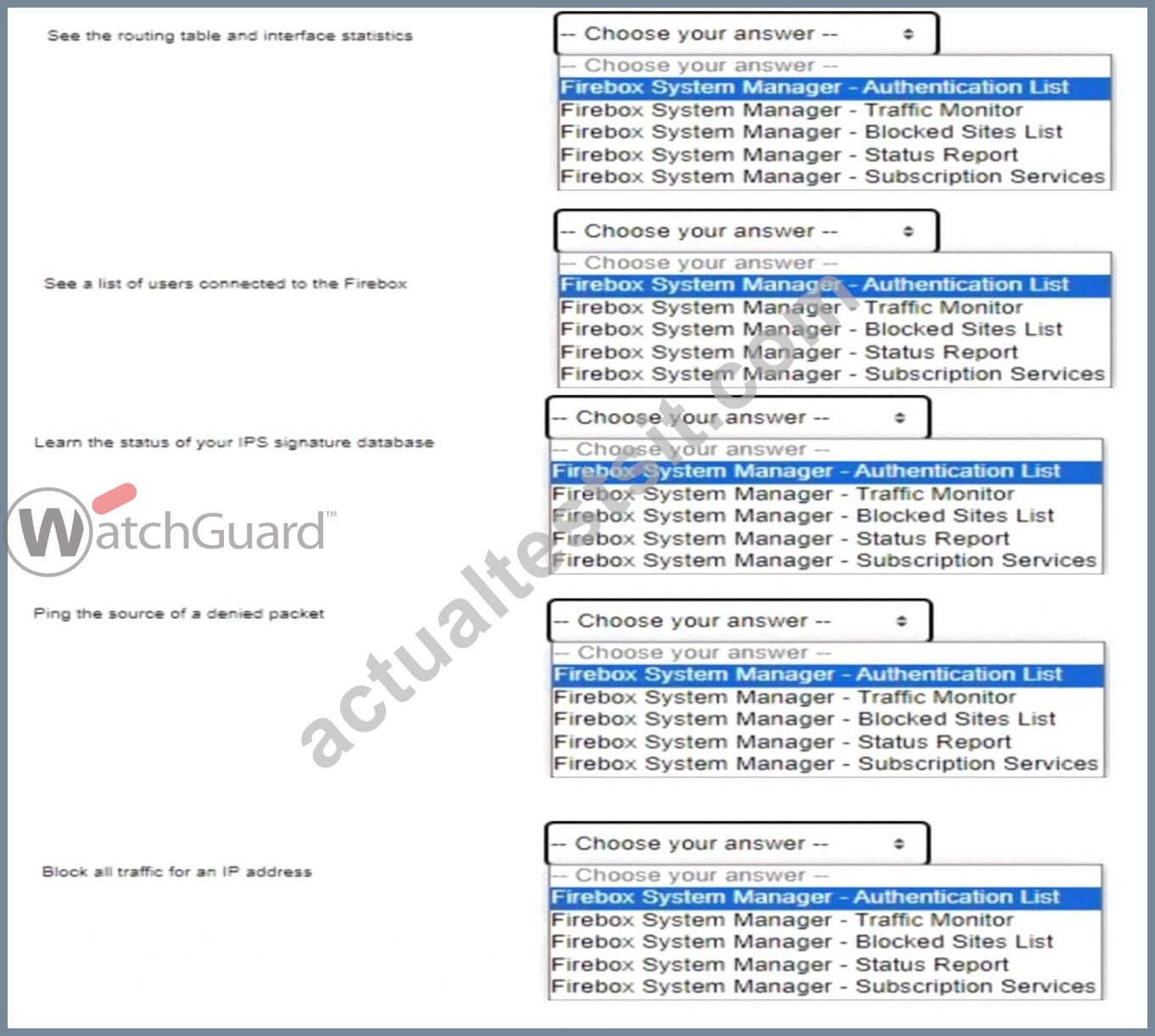
Answer:
Explanation: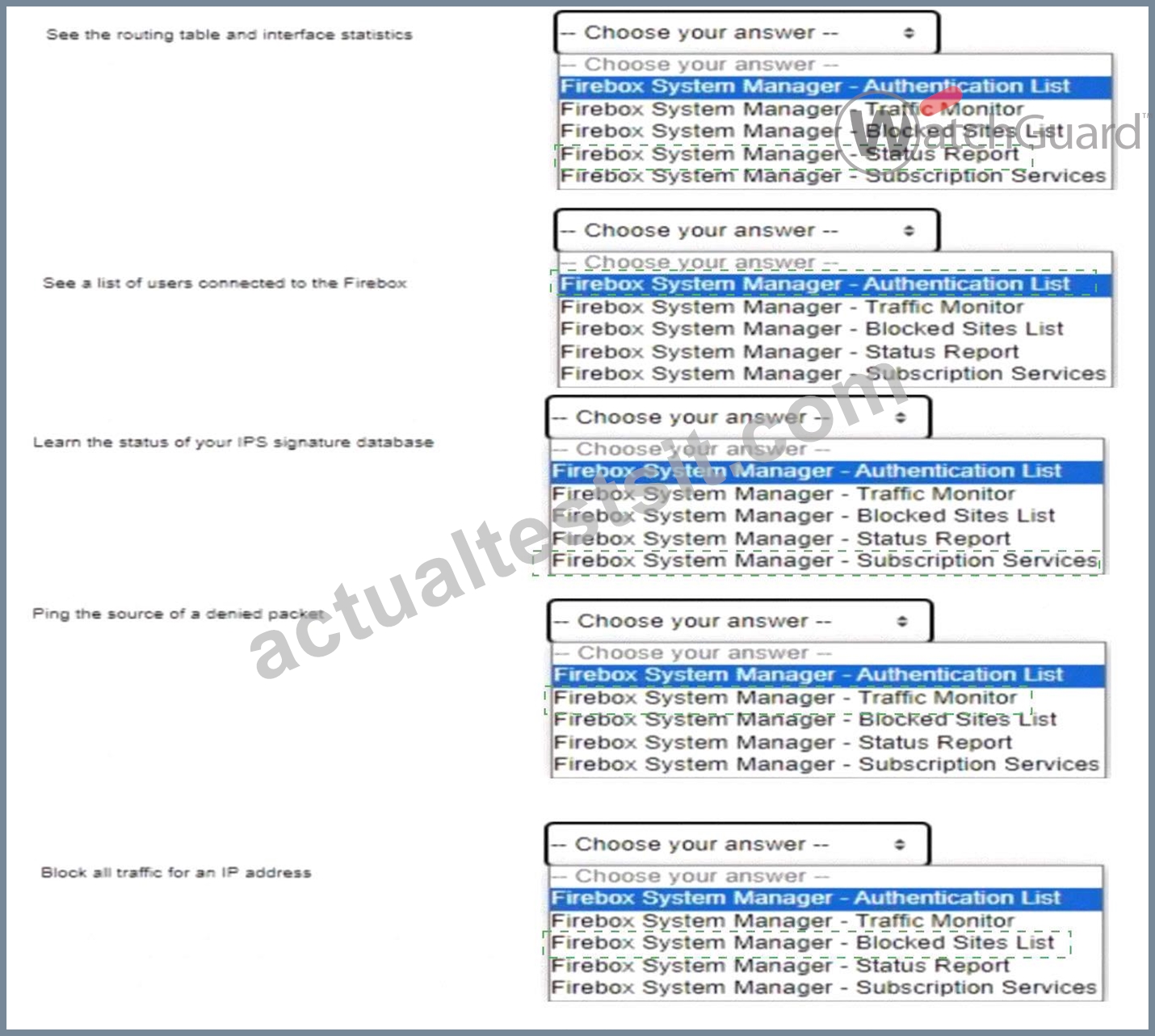
Explanation:
Here are the correct answers based on the Firebox System Manager interface functions:
* See the routing table and interface statisticsanswer:Firebox System Manager - Status Report Explanation: The Status Report section in Firebox System Manager includes information on network routing and interface statistics, providing insights into network paths and interface performance.
* See a list of users connected to the Fireboxanswer:Firebox System Manager - Authentication List Explanation: The Authentication List displays all active user sessions connected to the Firebox, showing authenticated users and their session details.
* Learn the status of your IPS signature databaseanswer:Firebox System Manager - Subscription Services Explanation: Subscription Services in FSM gives information on the status of services like IPS, showing the update status and version of the signature database.
* Ping the source of a denied packetanswer:Firebox System Manager - Traffic Monitor Explanation: The Traffic Monitor tool allows administrators to track packet details and offers functionality to ping sources directly, aiding in network troubleshooting.
* Block all traffic for an IP addressanswer:Firebox System Manager - Blocked Sites List Explanation: The Blocked Sites List feature in FSM lets administrators add IP addresses to a blacklist, blocking all incoming and outgoing traffic for specified addresses.
These answers utilize standard Firebox management features for performing administrative and diagnostic tasks efficiently. Let me know if you need further assistance with Firebox System Manager capabilities.
NEW QUESTION # 21
The Firebox can scan the contents of encrypted zip files with Gateway AntiVirus when HTTPS content inspection is enabled.
- A. True
- B. False
Answer: B
Explanation:
The Firebox cannot scan the contents of encrypted zip files even if HTTPS content inspection is enabled.
HTTPS content inspection allows the Firebox to inspect encrypted HTTPS traffic by decrypting it. However, the content within encrypted zip files remains inaccessible to Gateway AntiVirus scanning because the encryption key for the zip file is not available to the Firebox. This limitation is consistent with standard network security practices, where encrypted files need to be decrypted with a known key before content scanning can occur.
NEW QUESTION # 22
You want to send traffic from the Internet to your internal web server through the Firebox. You see the traffic is allowed in Traffic Monitor, but the web server cannot be reached. You use the TCP Dump Diagnostic Task and collect this information from the Firebox interface connected to the web server.
What could cause the problem? (Select two.)
- A. The HTTPS proxy is blocking the connection because Gateway AntiVirus detected a virus
- B. The web server default gateway is configured incorrectly
- C. The Firebox Dynamic NAT rules are configured incorrectly
- D. The IP address of the web server is on the Firebox Blocked Sites list
- E. The web server has firewall software installed that blocks incoming connections.
Answer: B,E
Explanation:
* Firewall Software Blocking Connections: If the web server has its own firewall software, it may be configured to block incoming connections. This would prevent the server from responding to requests, even if the Firebox is allowing the traffic through.
* Incorrect Default Gateway Configuration: If the web server's default gateway is not correctly set to route through the Firebox, it will be unable to respond to inbound traffic routed from external sources.
This misconfiguration is a common cause of connectivity issues in environments with complex network setups.
These two issues often lead to situations where the Firebox allows traffic, but the destination server is unreachable due to internal configurations.
NEW QUESTION # 23
If you have only one public IP address, can you use Static NAT to enable inbound connections to both an email server and a web server on the private network? (Select one.)
- A. Yes, if both servers use different ports
- B. No, you must use Dynamic NAT to route inbound connections to more than one server
- C. Yes, if both servers are on different private subnets
- D. No, you must assign a public IP address to each server
Answer: A
Explanation:
With only one public IP address, you can still configure Static NAT to route connections to both an email server and a web server, as long as each service is accessed on a different port. For instance, HTTP/HTTPS traffic for the web server can use port 80/443, while the email server can use ports associated with email protocols (e.g., 25 for SMTP). Static NAT can direct incoming requests to different internal servers based on port, making this approach feasible.
NEW QUESTION # 24
If policies are automatically ordered, which of these policies has the highest precedence? (Select one.)
- A. HTTPS policy - From: Trusted To: Any-External
- B. HTTPS policy - From: Any-Trusted, Any-Optional To: Any-External
- C. Outgoing policy - From: Any-Trusted, Any-Optional To: Any-External
- D. HTTPS policy - From: User1@Firebox-DB To: Any-External
Answer: D
Explanation:
When policies are automatically ordered, policies with more specific user-based criteria have higher precedence over general policies. In this scenario, an HTTPS policy for a specific user (e.g.,User1@Firebox- DB) would take precedence over policies that apply to broader groups or networks, such asAny-Trustedor Any-Optional. This ordering ensures that individual user rules are evaluated first before generic policies, providing finer access control.
NEW QUESTION # 25
In the network configuration shown in this image, which aliases include Eth2 as a member? (Select three.)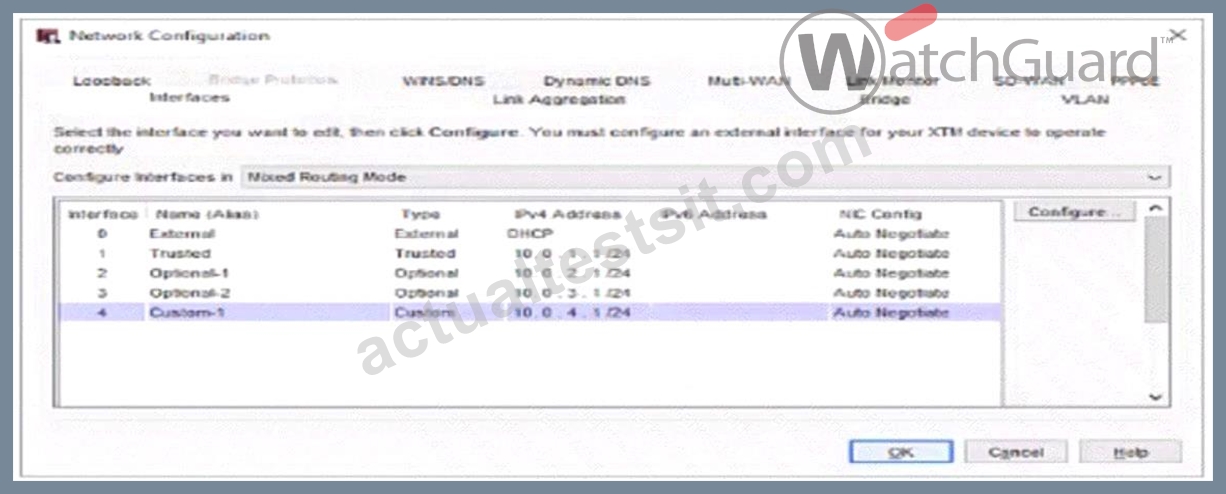
- A. Optional-1
- B. Any-External
- C. Any-Trusted
- D. Any
- E. Any-Optional
Answer: A,D,E
Explanation:
In the network configuration image provided, the interfaceOptional-1is mapped toEth2. Here's how the aliases work:
* Optional-1: Directly includes Eth2 since it's configured as Optional-1 in the network configuration.
* Any-Optional: This alias includes all optional interfaces, which would cover Eth2 as it is associated with Optional-1.
* Any: The "Any" alias includes all interfaces on the Firebox, covering all Trusted, Optional, and External interfaces. Thus, Eth2 is part of this alias by default.
Aliases likeAny-TrustedandAny-Externalwould not include Eth2 since it is configured as an Optional interface, not Trusted or External.
NEW QUESTION # 26
Which of these statements are true for this log message? (Select three.)
- A. The connection was denied
- B. The connection used an HTTP Packet Filter
- C. The connection used an HTTP Proxy
- D. Gateway AntiVirus detected a virus
- E. Application Control detected the application as a virus
- F. The URL path matched the proxy content type restrictions
Answer: A,C,D
Explanation:
Analyzing a typical Firebox log message for a denied connection with an associated virus detection involves recognizing multiple elements:
* HTTP Proxy Detection (C): If the connection utilized an HTTP proxy, this is typically noted in the log. Firebox's HTTP proxy is often used to inspect and manage web traffic, including scanning for malicious content.
* Gateway AntiVirus Detection (D): This service scans HTTP traffic for malware and will generate log messages if it identifies a virus. When a virus is detected, the action taken is generally to block the connection.
* Connection Denial (E): When a threat is detected (e.g., a virus via Gateway AntiVirus), Firebox policies are configured to deny the connection to prevent potential infection or data breaches. This is logged as a denied connection.
Other options, such as Application Control detecting a virus or the use of an HTTP Packet Filter, are not relevant in this context based on the function of HTTP proxies and Gateway AntiVirus in Firebox logs.
NEW QUESTION # 27
You can add your Firebox to WatchGuard Cloud but continue to manage it locally. When you do this, what additional features does WatchGuard Cloud provide for your locally-managed Firebox? (Select two.)
- A. Automatic Firebox firmware updates
- B. Unified event correlation and analysis
- C. Ability to schedule Firebox firmware updates
- D. Live status and access to reports
- E. Real-time network traffic data
Answer: C,D
Explanation:
When adding a Firebox to WatchGuard Cloud while maintaining local management:
* Option B: WatchGuard Cloud allows the scheduling of Firebox firmware updates, which provides flexibility in managing update timing without disrupting operations.
* Option E: It provides live status updates and reporting access, giving insights into device health and performance metrics for informed management decisions.
* Option A(Automatic firmware updates) is typically managed manually in a locally managed configuration.
* Option C(Real-time network traffic data) andOption D(Unified event correlation andanalysis) are advanced features that require full cloud management rather than hybrid (local/cloud) setup.
NEW QUESTION # 28
You have just configured Mobile VPN with IKEv2 for your customer. By default, authenticated Mobile VPN users are allowed to send traffic to all Firebox networks through the VPN.
- A. True
- B. False
Answer: B
Explanation:
In the default configuration ofMobile VPN with IKEv2, authenticated VPN users are only allowed access to specified networks or resources as defined by the VPN policy. They do not automatically have access to all Firebox networks through the VPN. To enable access to specific networks, administrators need to configure access routes explicitly within the Mobile VPN settings.
NEW QUESTION # 29
When Mobile VPN is enabled, remote users receive the domain name and DNS servers from the Firebox Network Configuration by default.
- A. True
- B. False
Answer: A
Explanation:
WhenMobile VPNis enabled on a Firebox, remote users receive network configuration settings, including domain nameandDNS server informationfrom the Firebox by default. This setupensures that remote users can resolve internal domain names and access network resources as though they were connected directly to the internal network. This functionality is essential for maintaining consistent user experience and connectivity while working remotely.
NEW QUESTION # 30
You configured a Firebox for a school environment. Students must have more restricted access than teachers, and unauthenticated users cannot have any Internet access. You added Student and Teacher groups to your proxy policies that handle web traffic. Based on the image below, this configuration can accomplish your goals.
- A. True
- B. False
Answer: A
Explanation:
The image shows a configuration for a school environment with separateHTTPandHTTPS proxy policiesfor StudentsandTeachers. This separation allows for different levels of access control based on group membership, providing more restrictive access for students compared to teachers.
* Studentsare restricted by specific HTTP and HTTPS proxy policies, limiting their access to designated content and sites.
* Teachershave their own policies, which can be configured with more permissive rules.
* Unauthenticated users are not included in any policy, effectively blocking their internet access, as the firewall denies traffic not explicitly allowed by a policy.
This configuration meets the requirements by:
* Allowing teachers and students access as per their respective policies.
* Blocking unauthenticated users from internet access entirely.
NEW QUESTION # 31
You can run TCP Dump directly from the Firebox.
- A. True
- B. False
Answer: B
Explanation:
You cannot runTCP Dumpdirectly from a Firebox device. While Firebox has various monitoring tools such as Traffic Monitor and Firebox System Manager, it does not natively support TCP Dump, which is a command-line tool primarily available on Linux-based systems. Instead, packet captures and traffic monitoring need to be handled through Firebox-specific tools or by exporting logs to external devices for further analysis.
NEW QUESTION # 32
Match the "network server to the protocol and port it uses."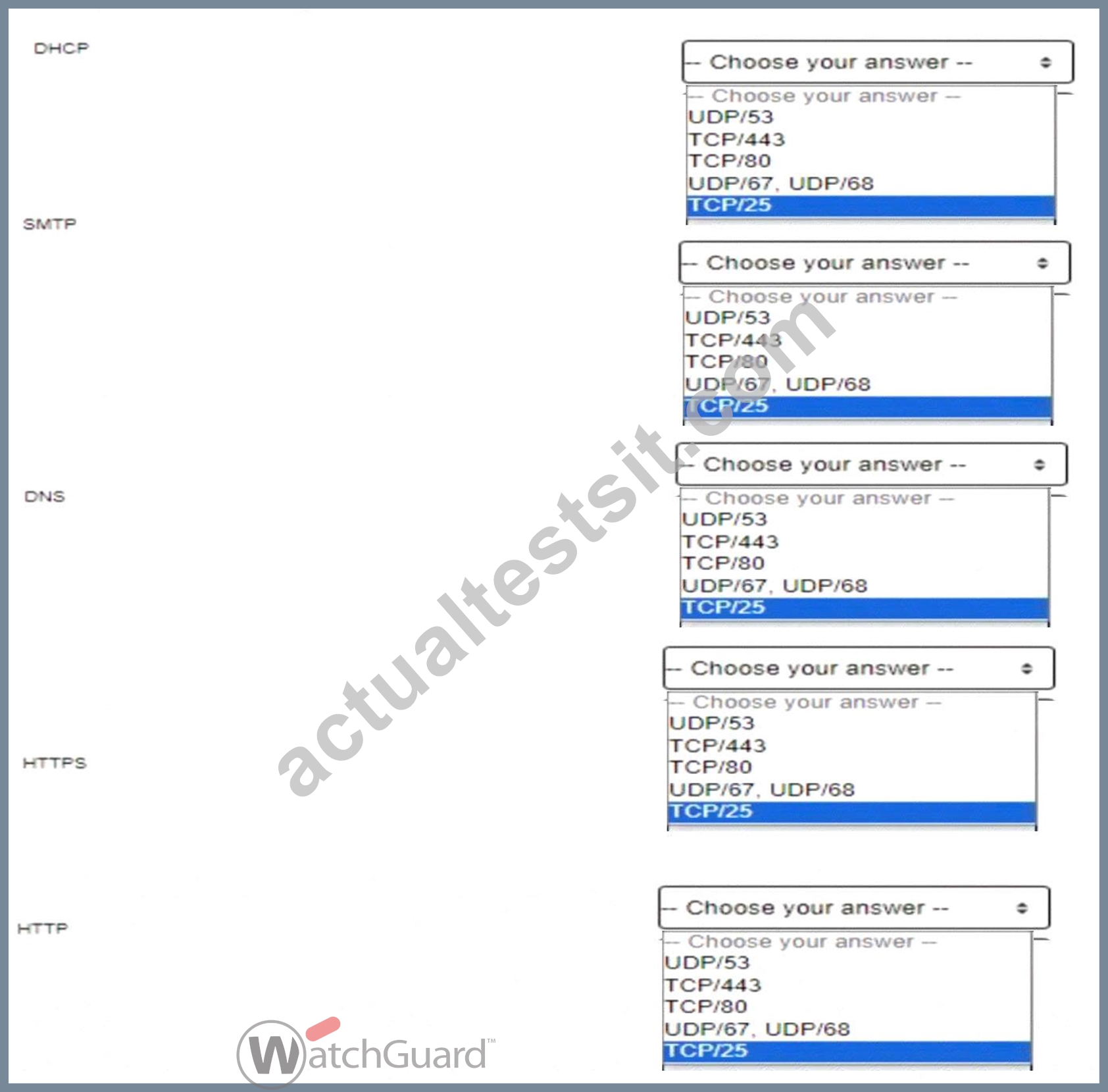
Answer:
Explanation: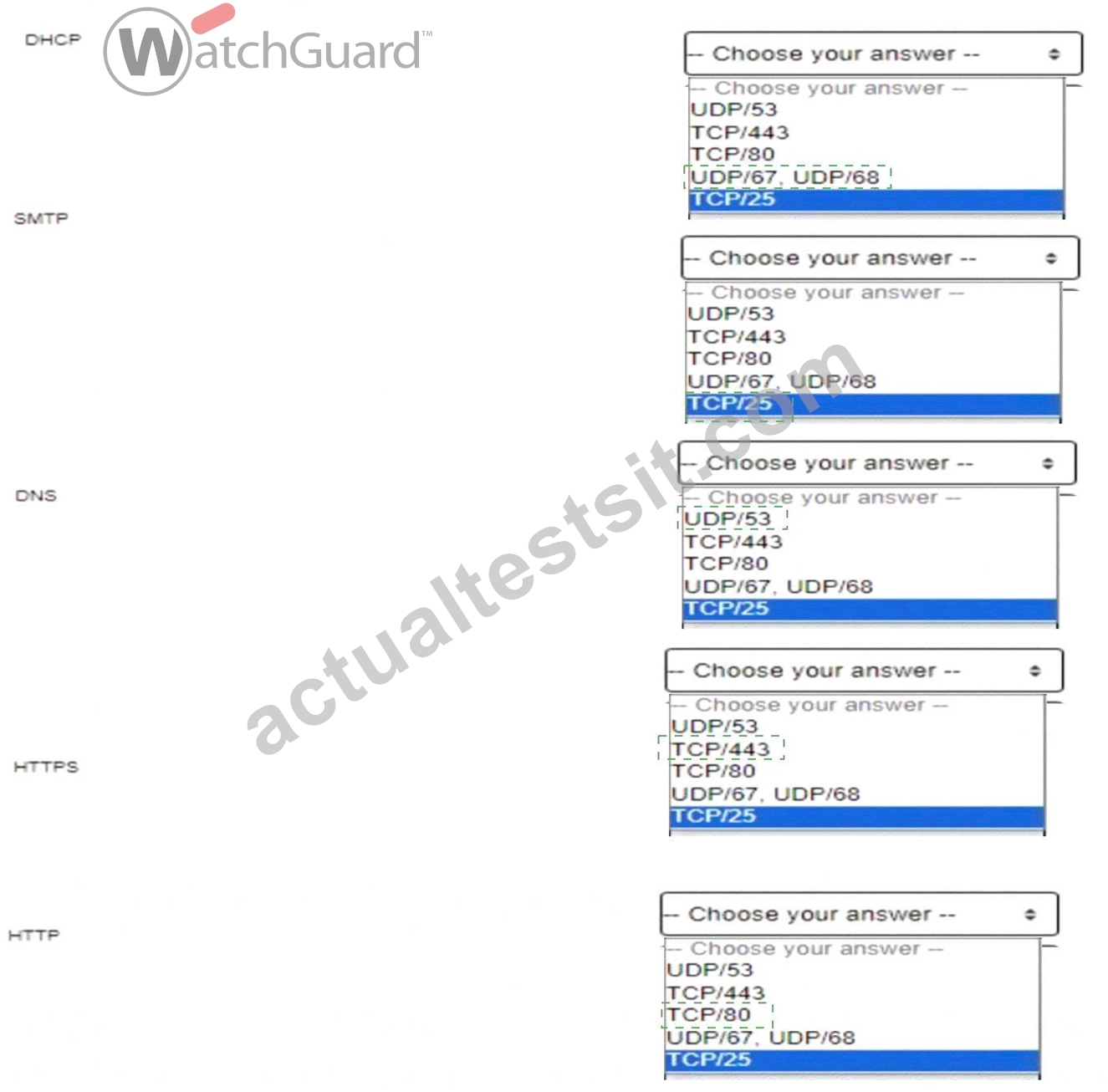
Explanation: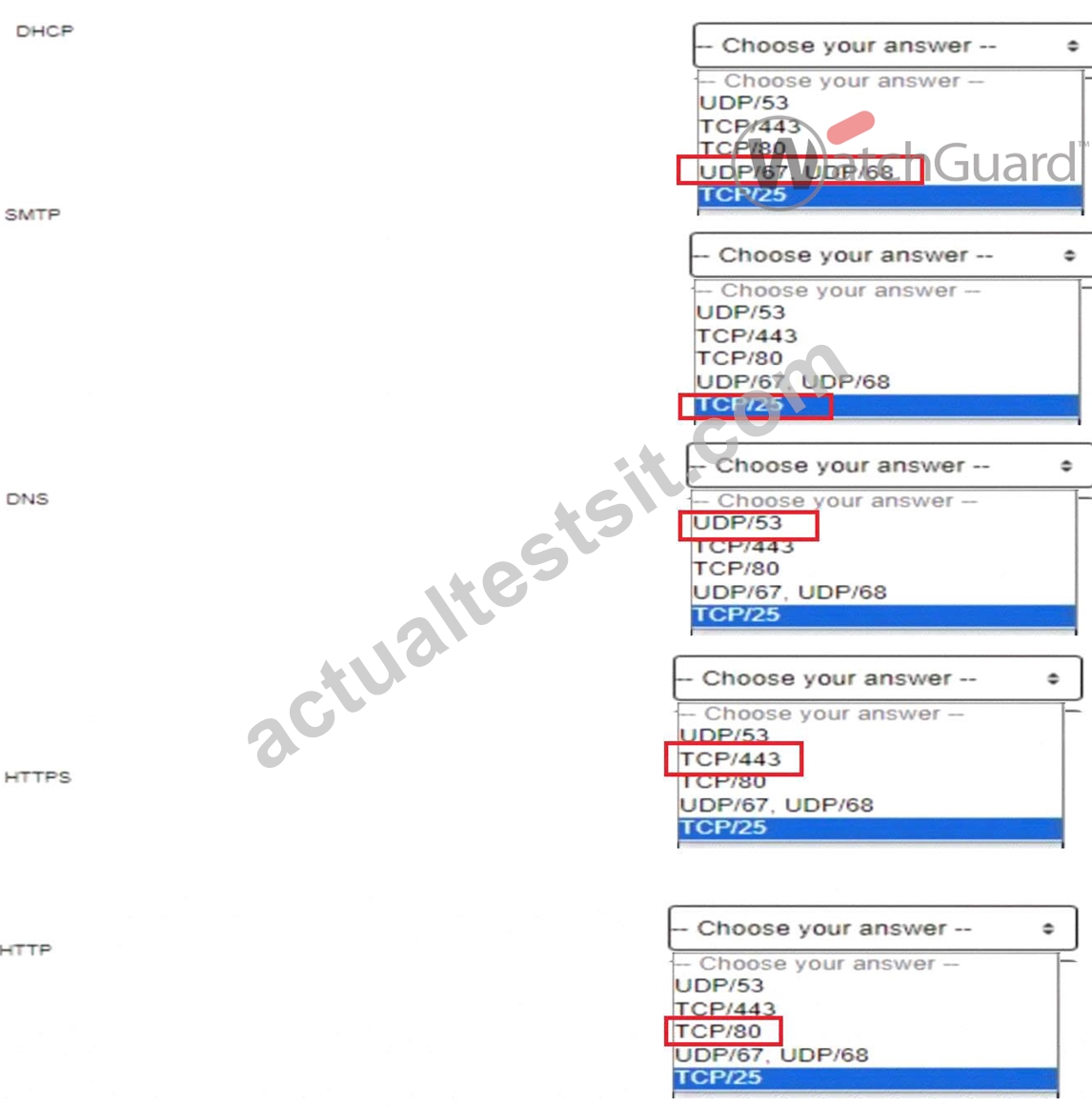
DHCP (Dynamic Host Configuration Protocol):DHCP operates over UDP ports 67 and 68. Port 67 is used by the DHCP server to listen for client requests, and port 68 is used by the DHCP client. This allows devices to automatically receive IP addresses and other network configuration details on a network, essential for automating IP management. [Referenced from multiple sources on network fundamentals] SMTP (Simple Mail Transfer Protocol):SMTP uses TCP port 25 for sending emails from client to server or between mail servers. SMTP is integral for email transmission, allowing efficient communication across mail servers within and outside organizational networks. [Referenced in standard protocols documentation in network management guides] DNS (Domain Name System):DNS typically runs on UDP port 53 for standard queries, with TCP/53 used for zone transfers and other larger requests. DNS is critical for resolving human-readable domain names into IP addresses, which allows users to connect to websites using easily remembered names rather than numerical IP addresses. [Foundational knowledge as detailed in network security and management resources] HTTPS (Hypertext Transfer Protocol Secure):HTTPS, an encrypted version of HTTP,operates on TCP port 443. It provides secure communication over the internet by encrypting data between the client and server using SSL/TLS, protecting data integrity and privacy. [Security essentials for network communications as found in secure web traffic documentation] HTTP (Hypertext Transfer Protocol):HTTP operates on TCP port 80 and is used for unencrypted web traffic. HTTP is the foundation of data exchange on the World Wide Web, supporting basic client-server interactions for retrieving resources from the web. [Basic networking knowledge referenced across multiple network essentials texts]
NEW QUESTION # 33
You configured email notifications in WatchGuard Cloud for your Firebox Device Alarms and want to receive an email when your users download any .exe files through an HTTP proxy. You must enable what type of log message in the Firebox configuration? (Select one.)
- A. Allowed traffic logs for the HTTP proxy policy
- B. Diagnostic logs for Gateway AntiVirus
- C. Alarm logs for the EXE/DLL Body Content rule in the HTTP proxy
- D. Denied traffic logs for the HTTP proxy policy
- E. Alarm logs for when a virus is detected in the HTTP proxy
Answer: C
Explanation:
To receive email notifications when users download .exe files through an HTTP proxy, you need to enable Alarm logs for the EXE/DLL Body Content rulein the HTTP proxy configuration on the Firebox. This setting ensures that alerts are triggered whenever executable files are detected, and WatchGuard Cloud can send notifications based on these alarms.
Other logging options, such as allowed or denied traffic logs, would not provide the specific alerts required for .exe file downloads through the proxy.
NEW QUESTION # 34
Which of these is a valid host IP address in the subnet 10.0.1.0/24? (Select one.)
- A. 10.0.1.100/24
- B. 10.0.1.0/24
- C. 10.0.10.24/24
- D. 10.0.1.255/24
- E. 10.0.0.1/24
Answer: A
Explanation:
The subnet 10.0.1.0/24 has an IP range from10.0.1.1 to 10.0.1.254. In a /24 subnet:
* The first address (10.0.1.0) is thenetwork addressand cannot be assigned to a host.
* The last address (10.0.1.255) is thebroadcast addressand also cannot be assigned to a host.
OptionC (10.0.1.100/24)falls within the valid range for host addresses in the 10.0.1.0/24 subnet, making it the correct answer.
* Option A(10.0.10.24) is in a different subnet (10.0.10.0/24).
* Option B(10.0.1.255) is the broadcast address.
* Option D(10.0.0.1) is in a different subnet (10.0.0.0/24).
* Option E(10.0.1.0) is the network address.
NEW QUESTION # 35
To accurately detect applications over an HTTPS connection with Application Control, you must enable content inspection in the HTTPS proxy.
- A. True
- B. False
Answer: A
Explanation:
For Application Control to accurately detect and manage applications over HTTPS connections, content inspection must be enabled in the HTTPS proxy. This is because HTTPS encrypts application traffic, making it unreadable without decryption. By enabling content inspection, the HTTPS proxy can inspect and classify the application traffic within HTTPS sessions, allowing Application Control to function effectively on secure connections.
NEW QUESTION # 36
......
100% Free Network-Security-Essentials Daily Practice Exam With 60 Questions: https://protechtraining.actualtestsit.com/WatchGuard/Network-Security-Essentials-exam-prep-dumps.html